
[Release] BK Macro Generator

Status
Not open for further replies.

Cvetanow


Joined
February 15th , 2022
Messages
80
Solutions
1
Reaction score
91
Location
Bulgaria
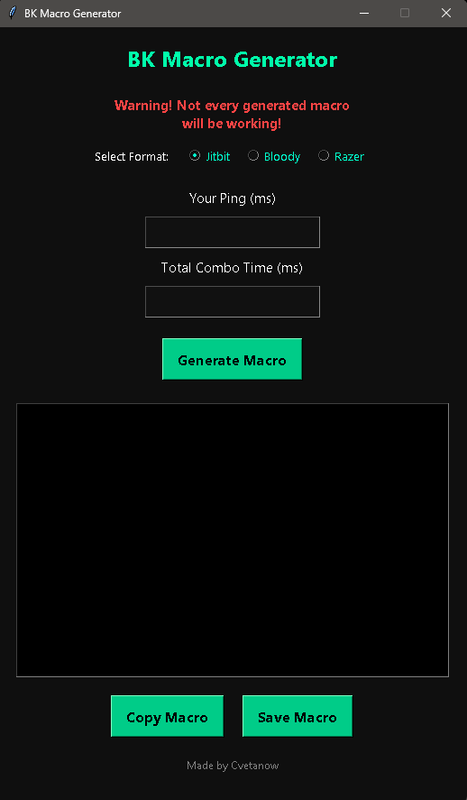
This is a simple macro generator tool designed to help players quickly create macros based on their ping and preferred total delay.

This tool is meant to make things easier for players who are not familiar with manually building or tuning macros.

macro-generator.png

How to Use


1. Select the program you want the macro generated for:
( Jitbit / Bloody / Razer )


2. Enter your in-game ping ( in milliseconds ):
Use the average ping you normally have while playing.


3. Enter the Total Delay ( in milliseconds ):
This is the overall combo speed (sum of all delays in the macro).


4. Click Generate Macro button


5. Click Copy to paste it into your macro software or click Save to save it as a file and load it into your software:
Saving is required for Bloody and Razer to load the file in the software.


How it Works

The generator adjusts delay timing based on your ping.
Each macro includes slight variation for more natural timing.
The total combo duration follows the value you enter.
You may need to test and slightly adjust the total delay for best results.

Disclaimer

This program is made for fun and experimental use.
It will not generate the absolute best or perfect macro.
It is designed to help players who do not know how to create or tune their own macros manually.
Fine-tuning may still be required to match your playstyle and connection.

Download: Link

If you encounter any issues with running the program feel free to message me!
 
This is very helpful! Thank you so much. Also hoping for DL and SM too 🤣
 
How can I check my game ping while playing, and how do I know the total delay?
I already put checking my ping in ExitLag, but I don’t understand what my total delay means.


2. Enter your in-game ping ( in milliseconds ):
Use the average ping you normally have while playing.


3. Enter the Total Delay ( in milliseconds ):
This is the overall combo speed (sum of all delays in the macro).
 
How can I check my game ping while playing, and how do I know the total delay?
I already put checking my ping in ExitLag, but I don’t understand what my total delay means.


2. Enter your in-game ping ( in milliseconds ):
Use the average ping you normally have while playing.


3. Enter the Total Delay ( in milliseconds ):
This is the overall combo speed (sum of all delays in the macro).
You can check the ping in Pingzapper/Exitlag or any other VPN while connected to infinityMU if you aren't using a VPN is a bit harder to check - pinging the server can be used as an option.

The total delay is a sum of all delays in a macro. Example: 600ms that is the total sum of all delays in 1 macro. Higher ms means slower script, lower ms means faster script.
 
You can check the ping in Pingzapper/Exitlag or any other VPN while connected to infinityMU if you aren't using a VPN is a bit harder to check - pinging the server can be used as an option.

The total delay is a sum of all delays in a macro. Example: 600ms that is the total sum of all delays in 1 macro. Higher ms means slower script, lower delays means faster script.
Got it, thanks! This macro generator is going to make adjustments so much easier. I can finally test different delays slow, medium, and fast. This is a huge help for beginners and will make it way faster for every player to find their perfect timing. i hope i got perfect timing 100% no Flinch :p:p:p:p:p:p
 
Hi, yesterday I did PvP with a macro generated with this, and it really worked for me (not exactly, but it did work) Thank you for sharing this with us!!
This is a simple macro generator tool designed to help players quickly create macros based on their ping and preferred total delay.

This tool is meant to make things easier for players who are not familiar with manually building or tuning macros.
macro-generator.png

How to Use


1. Select the program you want the macro generated for:
( Jitbit / Bloody / Razer )


2. Enter your in-game ping ( in milliseconds ):
Use the average ping you normally have while playing.


3. Enter the Total Delay ( in milliseconds ):
This is the overall combo speed (sum of all delays in the macro).


4. Click Generate Macro button


5. Click Copy to paste it into your macro software or click Save to save it as a file and load it into your software:
Saving is required for Bloody and Razer to load the file in the software.


How it Works

The generator adjusts delay timing based on your ping.
Each macro includes slight variation for more natural timing.
The total combo duration follows the value you enter.
You may need to test and slightly adjust the total delay for best results.

Disclaimer

This program is made for fun and experimental use.
It will not generate the absolute best or perfect macro.
It is designed to help players who do not know how to create or tune their own macros manually.
Fine-tuning may still be required to match your playstyle and connection.

Download: Link

If you encounter any issues with running the program feel free to message me!
 
Lol this is not accurate
okay, and? that’s it? if you’re going to make that claim, at least explain how it’s inaccurate. which part is wrong? what standard are you using?

do you know what "accurate" or "perfect" looks like? if you actually have a better or more correct version in mind, tell us.

point out what needs to be fixed, what’s missing, and what should be improved. otherwise, dropping a vague comment like that doesn’t add anything to the discussion.
 
You can check the ping in Pingzapper/Exitlag or any other VPN while connected to infinityMU if you aren't using a VPN is a bit harder to check - pinging the server can be used as an option.

The total delay is a sum of all delays in a macro. Example: 600ms that is the total sum of all delays in 1 macro. Higher ms means slower script, lower ms means faster script.
Well done for explaining it in a straight forward manner, I can't really figure out my script in the past few weeks, month. Imma go and try this in my free time. Thanks a lot
 
okay, and? that’s it? if you’re going to make that claim, at least explain how it’s inaccurate. which part is wrong? what standard are you using?

do you know what "accurate" or "perfect" looks like? if you actually have a better or more correct version in mind, tell us.

point out what needs to be fixed, what’s missing, and what should be improved. otherwise, dropping a vague comment like that doesn’t add anything to the discussion.
He already answered me! He knows what i mean. Thanks sir
okay, and? that’s it? if you’re going to make that claim, at least explain how it’s inaccurate. which part is wrong? what standard are you using?

do you know what "accurate" or "perfect" looks like? if you actually have a better or more correct version in mind, tell us.

point out what needs to be fixed, what’s missing, and what should be improved. otherwise, dropping a vague comment like that doesn’t add anything to the discussion.
he
okay, and? that’s it? if you’re going to make that claim, at least explain how it’s inaccurate. which part is wrong? what standard are you using?

do you know what "accurate" or "perfect" looks like? if you actually have a better or more correct version in mind, tell us.

point out what needs to be fixed, what’s missing, and what should be improved. otherwise, dropping a vague comment like that doesn’t add anything to the discussion.
He Already Answered me! He knows what I mean
Post automatically merged:

The inaccuracy of 1ms difference is fixed, the updated program can be downloaded from the same link.
Thanks
 
Status
Not open for further replies.
Back
Top Bottom