[RELEASE] SuperCrisMacro: The Ultimate Auto Pot & Auto Combo Tool ⚔️

Status
Not open for further replies.

SuperCris

Infinity Addicted
Joined
March 15th , 2012
Messages
1,600
Reaction score
2,089
Age
31
Location
Uruguay
Hello community! 👋

Today I want to share with you a personal project I’ve been developing to take the gameplay experience in InfinityMu.

Many existing macros are slow, have outdated interfaces, or simply don't respond fast enough in critical PvP.
My goal was to create a tool that is lightweight, modern, and extremely precise.

🚀 What makes this Macro different?
Most macros use simple sleep functions that block the program or generate artificial input lag. SuperCrisMacro is designed with a low-level, multi-threaded architecture:

Zero Latency (Real):
Default library delays have been removed (PAUSE = 0.0). This means there is absolutely no software delay between the command and the actual Q/W/E key press.

Smart Sleep & Multithreading: Unlike other bots that "freeze" during delays, this one uses a "Smart Sleep" system on separate threads. This allows the program to check if you want to stop the macro thousands of times per second, responding instantly to the STOP button or your Hotkey, without waiting for the combo animation to finish.

Millisecond Precision:
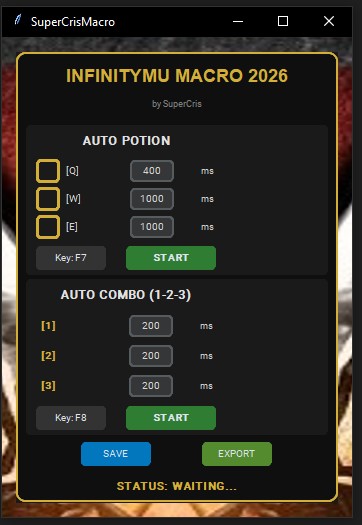
Independent Auto Pot: Separate delays for [Q], [W], and [E].
Advanced Auto Combo: You can configure the exact milliseconds between each skill in the combo (1-2-3). If your Skill 2 is slower, you can adjust just that one!
Compact & Modern Design: Dark, minimalist, and ultra-compact GUI, designed to take up minimal screen space.

🛠️ How was it made?
This software was programmed entirely in Python using modern technologies:

CustomTkinter: For a high-resolution, native dark-mode GUI.
PyDirectInput: To simulate keyboard inputs at the driver level (DirectX), ensuring the game recognizes keystrokes without blocking them.
Threading: To handle multiple processes (Pot and Combo) simultaneously without one interfering with the speed of the other.

🎮 Key Features:
✅ Customizable Hotkeys: Set your activation keys on the fly.
✅ Auto-Save: Your configuration saves and loads automatically.
✅ Exportable Profiles: Share your perfect setup with friends.
✅ Lightweight Mode: "Ultra Compact" interface to stay out of your way.


ap.jpg


Download v1.1 19/01/2026 : https://www.mediafire.com/file/krk727ibo94xprz/SuperCris+Macro.rar/file


I hope you find it as useful as I do! Any feedback is welcome.
 
Last edited:
Hello community! 👋

Today I want to share with you a personal project I’ve been developing to take the gameplay experience in InfinityMu.

Many existing macros are slow, have outdated interfaces, or simply don't respond fast enough in critical PvP.
My goal was to create a tool that is lightweight, modern, and extremely precise.

🚀 What makes this Macro different?
Most macros use simple sleep functions that block the program or generate artificial input lag. SuperCrisMacro is designed with a low-level, multi-threaded architecture:

Zero Latency (Real):
Default library delays have been removed (PAUSE = 0.0). This means there is absolutely no software delay between the command and the actual Q/W/E key press.

Smart Sleep & Multithreading: Unlike other bots that "freeze" during delays, this one uses a "Smart Sleep" system on separate threads. This allows the program to check if you want to stop the macro thousands of times per second, responding instantly to the STOP button or your Hotkey, without waiting for the combo animation to finish.

Millisecond Precision:
Independent Auto Pot: Separate delays for [Q], [W], and [E].
Advanced Auto Combo: You can configure the exact milliseconds between each skill in the combo (1-2-3). If your Skill 2 is slower, you can adjust just that one!
Compact & Modern Design: Dark, minimalist, and ultra-compact GUI, designed to take up minimal screen space.

🛠️ How was it made?
This software was programmed entirely in Python using modern technologies:

CustomTkinter: For a high-resolution, native dark-mode GUI.
PyDirectInput: To simulate keyboard inputs at the driver level (DirectX), ensuring the game recognizes keystrokes without blocking them.
Threading: To handle multiple processes (Pot and Combo) simultaneously without one interfering with the speed of the other.

🎮 Key Features:
✅ Customizable Hotkeys: Set your activation keys on the fly.
✅ Auto-Save: Your configuration saves and loads automatically.
✅ Exportable Profiles: Share your perfect setup with friends.
✅ Lightweight Mode: "Ultra Compact" interface to stay out of your way.

ap.jpg


Download : https://www.mediafire.com/file/ttdf6k9twz6v22m/SuperCrisMacro.exe/file


I hope you find it as useful as I do! Any feedback is welcome.
sir please share scripts for this macro, thank you .
 
Hello community! 👋

Today I want to share with you a personal project I’ve been developing to take the gameplay experience in InfinityMu.

Many existing macros are slow, have outdated interfaces, or simply don't respond fast enough in critical PvP.
My goal was to create a tool that is lightweight, modern, and extremely precise.

🚀 What makes this Macro different?
Most macros use simple sleep functions that block the program or generate artificial input lag. SuperCrisMacro is designed with a low-level, multi-threaded architecture:

Zero Latency (Real):
Default library delays have been removed (PAUSE = 0.0). This means there is absolutely no software delay between the command and the actual Q/W/E key press.

Smart Sleep & Multithreading: Unlike other bots that "freeze" during delays, this one uses a "Smart Sleep" system on separate threads. This allows the program to check if you want to stop the macro thousands of times per second, responding instantly to the STOP button or your Hotkey, without waiting for the combo animation to finish.

Millisecond Precision:
Independent Auto Pot: Separate delays for [Q], [W], and [E].
Advanced Auto Combo: You can configure the exact milliseconds between each skill in the combo (1-2-3). If your Skill 2 is slower, you can adjust just that one!
Compact & Modern Design: Dark, minimalist, and ultra-compact GUI, designed to take up minimal screen space.

🛠️ How was it made?
This software was programmed entirely in Python using modern technologies:

CustomTkinter: For a high-resolution, native dark-mode GUI.
PyDirectInput: To simulate keyboard inputs at the driver level (DirectX), ensuring the game recognizes keystrokes without blocking them.
Threading: To handle multiple processes (Pot and Combo) simultaneously without one interfering with the speed of the other.

🎮 Key Features:
✅ Customizable Hotkeys: Set your activation keys on the fly.
✅ Auto-Save: Your configuration saves and loads automatically.
✅ Exportable Profiles: Share your perfect setup with friends.
✅ Lightweight Mode: "Ultra Compact" interface to stay out of your way.


ap.jpg


Download : https://www.mediafire.com/file/ttdf6k9twz6v22m/SuperCrisMacro.exe/file


I hope you find it as useful as I do! Any feedback is welcome.
Great job , keep it bro thank u
 
The program still needs work and save settings function & config file.
1. Auto potion settings does not save.
2. Auto combo sometimes does not start.
3. Setting hotkey for AP/AC causes the app to hang and crash.

Thanks for contribution btw.
 
Last edited:
Does anyone know how to set it up?
 
The program still needs work and save settings function & config file.
1. Auto potion settings does not save.
2. Auto combo sometimes does not start.
3. Setting hotkey for AP/AC causes the app to hang and crash.

Thanks for contribution btw.

Thank you for the report.
An update with all the reported fixes will be released soon.
 
I have a question, and I mean no harm with it when I ask it, I am just curious. I always saw you being an avid hater of AC applications, which I completely understand and can emphasise with, what brought you to the point where you decided to develop an application of your own? Regardless of the answer, it's great that you are developing it and I wish you success of getting it to the point where it rivals best applications out there.
 
I have a question, and I mean no harm with it when I ask it, I am just curious. I always saw you being an avid hater of AC applications, which I completely understand and can emphasise with, what brought you to the point where you decided to develop an application of your own? Regardless of the answer, it's great that you are developing it and I wish you success of getting it to the point where it rivals best applications out there.

Hello!
I think the answer to your question is very easy for me to give. It’s true, I am completely against the use of macros, I have always said it publicly here on the forum.
The creation of the program came about one day when I was bored at home, and I simply thought, why not do it?
I have always liked helping people and posting new things here on the forum for the community, and that is the real reason.
another reason I realized while I was creating the program is that most macros use very old and obsolete systems. I am sure that once I fix the current errors it has, it will be far superior to the rest of the macros.
Post automatically merged:

The program still needs work and save settings function & config file.
1. Auto potion settings does not save.
2. Auto combo sometimes does not start.
3. Setting hotkey for AP/AC causes the app to hang and crash.

Thanks for contribution btw.

📋 CHANGELOG - SuperCrisMacro v1.1

1. Hotkeys Not Working with Game Active

Issue: Hotkeys on/off didn't respond when InfinityMU was in focus
Solution: Implemented native detection using Windows API's GetAsyncKeyState via ctypes, which works at OS level and cannot be blocked by the game
Result: Hotkeys now work 100% reliably regardless of which window is active
2. GUI Freezing When Setting Hotkeys

Issue: Clicking "Set Hotkey" froze the interface while waiting for key input
Solution: Moved key reading to a separate thread and used self.after() for thread-safe UI updates
Result: Interface remains responsive throughout configuration
3. Auto-Save Configuration (Unwanted)

Issue: Program automatically saved to config.json without user permission
Solution: Removed auto-save and added manual "IMPORT" and "EXPORT" buttons
Result: User has full control over when to save/load configurations

Version: 1.1
Date: January 2026
Author: SuperCris
Built with: Python
Tested on: InfinityMU Server

Download v 1.1 : https://www.mediafire.com/file/krk727ibo94xprz/SuperCris+Macro.rar/file

Thanks to @RESiSTANT for the reports.
If anyone else finds a bug or wants to add an extra feature, feel free to let us know.
 
Last edited:
First i will want to thank you for your hard work but i have some feedback

1. it will be good if you can add for the auto combo side where you can choose options on doing 123 or 1232. some people like doing combo 1232

2. i am not sure about was it my pc is slow or something ( i was testing on old laptop ) but when i test the AC on notepad it works fine but when i try it in game i notice that the skill rotation of 123 is not smooth where it goes 123 12 123 123 13 123 12 etc like its missing 1 skill either 1,2 or 3 after a few rounds of 123 ( note default timing of 200ms )

when it miss one if the skill it the total delay is the same
123 12(delay) 123 123 1(delay)3 123 12(delay)

All the best
 
Hello!
I think the answer to your question is very easy for me to give. It’s true, I am completely against the use of macros, I have always said it publicly here on the forum.
The creation of the program came about one day when I was bored at home, and I simply thought, why not do it?
I have always liked helping people and posting new things here on the forum for the community, and that is the real reason.
another reason I realized while I was creating the program is that most macros use very old and obsolete systems. I am sure that once I fix the current errors it has, it will be far superior to the rest of the macros.
Post automatically merged:


📋 CHANGELOG - SuperCrisMacro v1.1

1. Hotkeys Not Working with Game Active

Issue: Hotkeys on/off didn't respond when InfinityMU was in focus
Solution: Implemented native detection using Windows API's GetAsyncKeyState via ctypes, which works at OS level and cannot be blocked by the game
Result: Hotkeys now work 100% reliably regardless of which window is active
2. GUI Freezing When Setting Hotkeys

Issue: Clicking "Set Hotkey" froze the interface while waiting for key input
Solution: Moved key reading to a separate thread and used self.after() for thread-safe UI updates
Result: Interface remains responsive throughout configuration
3. Auto-Save Configuration (Unwanted)

Issue: Program automatically saved to config.json without user permission
Solution: Removed auto-save and added manual "IMPORT" and "EXPORT" buttons
Result: User has full control over when to save/load configurations

Version: 1.1
Date: January 2026
Author: SuperCris
Built with: Python
Tested on: InfinityMU Server

Download v 1.1 : https://www.mediafire.com/file/krk727ibo94xprz/SuperCris+Macro.rar/file

Thanks to @RESiSTANT for the reports.
If anyone else finds a bug or wants to add an extra feature, feel free to let us know.
hi good day , thanks for sharing this supercris, but when i finished downloading it keeps saying virus detected and will not proceed, kindly advised for solution , thanks.

 
Status
Not open for further replies.
Back
Top Bottom